UV Pool Startup After a Power Outage: Check Flow Before the Lamp Runs
| November 3, 2026
Disclosure: This article contains affiliate links. As an Amazon Associate, UV Pool Filter may earn from qualifying purchases.
A power outage can make a UV pool system look ready before the plumbing is ready. When electricity returns, a timer or automation controller may restart the pump and sanitizer in an order you did not expect. A short restart check helps you confirm circulation, air removal, leaks, and water chemistry before you assume the UV lamp is doing its job.
This is a model-neutral visual and operating check for a residential pool UV system after an outage. Your equipment may use a different controller, flow switch, air-bleed arrangement, or startup sequence. Read the exact manual first, and do not open an electrical enclosure or defeat a safety device to make the system run.
Shop pool restart flashlights, leak-check supplies, and water-test kits on Amazon. Choose equipment that fits your system and use the product instructions rather than guessing at compatibility.
What changes when power comes back
A power interruption can reset a clock, cancel a temporary pump command, or leave a breaker and controller in different states. It can also stop circulation while the pool remains uncovered, exposed to debris, or subject to heat and sunlight. The first question is not whether the UV indicator is glowing. It is whether the complete circulation path has restarted safely.
For example, the Pentair BioShield UV System Installation and User’s Guide describes a startup sequence that includes turning on the pump, allowing air to escape through the approved air-bleed step, energizing the UV ballast, and checking for lamp illumination and leaks. It also says the flow switch controls the lamp during flow and low-flow conditions. Those instructions apply to that product; use your own manual when the hardware differs.
Start at the breaker, controller, and clock
From a dry location, look at the equipment pad without removing covers. Confirm that the correct breaker or disconnect is on, the controller shows a sensible time, and any outage or alarm message is understood. If the controller has a manual override, do not leave it running simply because the pump can be heard. Return it to the schedule recommended by the manufacturer after the inspection.
Do not reset a GFCI repeatedly, bypass a breaker, or use an extension cord as a workaround. A tripped protection device, damaged cable, wet controller, burning smell, or unexplained alarm belongs with a qualified pool-equipment or electrical professional.
Confirm circulation before expecting UV operation
Watch the pump start from a safe position. Check the pump lid and visible plumbing for a normal prime, then look for steady return flow at the pool. Avoid using a pressure number from another model as a pass or fail. Filter type, plumbing, valves, and the manufacturer’s design all affect readings.
Next, inspect the UV chamber for the signs your manual identifies: a flow or status indicator, a view-port lamp indication, or a controller message. A lamp indicator alone is not proof that water is moving through the chamber. If the flow indicator remains in a fault state, stop troubleshooting at the manual’s owner-safe steps and call service rather than forcing the lamp on.
Remove trapped air only the approved way
After an outage, air can collect at a high point in the equipment. If your unit has an owner-serviceable air-bleed valve, follow the manual for pump operation and closing the valve. Keep your face and hands away from fittings that may be pressurized, and never loosen a cap, union, drain plug, or vessel clamp while the system is running unless the manufacturer specifically directs that action.
The CMP DEL AOP 50 system-startup instructions use the power and flow indicators to distinguish an energized unit from one with adequate water moving through it. The exact indicators differ across products, but the lesson is useful: treat power status and flow status as separate checks. Do not invent a flow threshold for a different UV or AOP model.
Look for leaks before leaving the system unattended
Use a flashlight to inspect unions, end caps, drain plugs, the quartz-sleeve area, and the floor below the equipment. A small drip can become a wet electrical hazard or allow air into the circulation path. If you see water near a controller, ballast, cord entry, or electrical connection, turn the system off using the approved control and get qualified help.
Do not treat a clear view-port glow as permission to ignore a leak. Follow the manual’s shutdown, depressurization, and repair restrictions before touching the chamber. After any service, perform the required leak check before returning the equipment to normal operation.
Check water chemistry after circulation returns
UV equipment supports a sanitizer program; it does not replace a measurable sanitizer residual, balanced water, filtration, or circulation. Test the pool after the system has circulated according to your normal care routine, especially if the outage lasted long enough for the water to warm or collect debris. Use the Pool Chemical Calculator website, or check the iPhone app and Android app after testing.

When a restart should become a service call
Call a qualified technician or electrician when the pump will not prime, a GFCI or breaker trips again, water reaches electrical parts, the UV flow signal stays in fault, the controller clock or automation behaves unpredictably, the vessel is damaged, or the manual limits diagnosis to trained service. Never defeat a flow switch, interlock, GFCI, or low-flow shutdown.
Safety note: This is pool-care information, not medical advice, electrical instruction, or a substitute for code-compliant service. Follow the equipment manual, product labels, local electrical code, and manufacturer restrictions. Keep swimmers out of a pool with unsafe water or damaged equipment, and ask a qualified professional about any electrical, pressure, leak, or water-quality condition you cannot verify safely.
Recommended pool maintenance supplies
As an Amazon Associate, UV Pool Filter earns from qualifying purchases.

A clean cartridge helps protect flow through UV equipment and clears cloudy water faster.
View on Amazon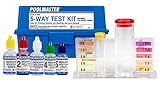
UV helps supplemental sanitation, but chlorine, pH, and alkalinity still need testing.
View on Amazon
UV does not replace a measurable sanitizer residual in the pool water.
View on AmazonFAQ
Should a UV pool system restart automatically after a power outage?
It depends on the controller, timer, and manufacturer settings. Confirm the clock, schedule, breaker, pump prime, flow indication, and leak condition before assuming the restart is complete. Follow the exact manual for your equipment.
Does a glowing UV lamp prove that water is flowing?
No. Power and water flow are separate checks. Use the system’s approved flow or status indication and the manual’s startup procedure. Never bypass a flow switch or low-flow shutdown to make the lamp operate.
What should I do if the UV flow light stays in a fault state?
Stop at the owner-safe troubleshooting steps in the manual. Check only visible, permitted items such as the pump prime, valve positions, and obvious leaks. If the fault remains, call qualified service instead of changing wiring, opening the vessel, or forcing the system on.
Should I retest pool chemistry after a long outage?
Yes. UV treatment does not replace sanitizer residual, filtration, circulation, or balanced water. Test after circulation resumes and adjust only according to your test results, product labels, and normal pool-care procedure.