UV Pool GFCI Outlet Power Check: Make Sure the Sanitizer Stays Safely Energized
| October 3, 2026
Disclosure: This article contains affiliate links. As an Amazon Associate, UV Pool Filter may earn from qualifying purchases.
A UV pool GFCI outlet power check is one of those small equipment-pad habits that can save you from a silent sanitizer outage. A tripped outlet, loose cord, weather-damaged cover, timer mismatch, or switched-off controller may leave the chamber looking installed but doing nothing for the water passing through it.
This check is not a DIY electrical repair. It is a practical owner-level review: confirm the UV unit has safe, intended power, compare the setup to the equipment manual, and call a qualified electrician or pool professional when anything looks damaged, wet, improvised, or beyond the manual’s homeowner instructions.
Compare pool UV power accessories, weatherproof covers, and outlet testers on Amazon. Match any replacement part to local code, the installed equipment, and a qualified professional’s recommendation before ordering.
Start with the manual before touching the outlet
Find the brand and model on the UV sanitizer, AOP unit, or controller. Then read the installation and safety sections for that exact product. The Pentair BioShield UV installation guide says the unit must be used with a properly grounded GFCI. The Hayward HydraPure owner manual warns to turn off power at the source before electrical connections or service and to disconnect the unit before service. The CMP DEL AOP electrical instructions tell installers to follow electrical-code requirements and connect the unit so it runs with the pool pump.
Those details matter because a UV system is both pool equipment and electrical equipment. You don’t need to guess whether a cord, receptacle, timer, or bonding detail is “probably fine.” If the manual points that work to a licensed professional, leave it there.
What an owner-level power check can catch
Stand back and look at the whole setup first. The UV controller should be dry, secure, and mounted where the manufacturer allows. The cord should route cleanly without stretching, pinching, sitting in standing water, or rubbing against a sharp equipment edge. A plugged-in cord should be fully seated, and the outlet cover should protect the connection when the plug is in use. If you can’t see the full cord path, do not tug on it; clear the view or ask the service company to confirm it during the next visit.
If the UV unit is supposed to run with the pool pump, compare what the controller does when the pump schedule starts. You are looking for the simple clues: an expected power light, a normal controller display, no obvious fault message, and no outlet cover hanging open after rain or irrigation. Do not open electrical enclosures, bypass a GFCI, tape over a reset button, or keep resetting a device that trips again.
- Confirm the UV unit is plugged into the intended GFCI-protected power source or hardwired setup described by the manual.
- Check that the in-use outlet cover closes around the cord without pinching it.
- Look for scorch marks, cracked plastic, corrosion, buzzing, heat, a loose receptacle, or water intrusion.
- Compare the controller’s normal lights or display with the manual’s operation section.
- Save a clear photo of the outlet, controller, cord route, and pump timer after a professional confirms the setup.
After storms, service visits, and schedule changes
Power problems often show up after something else happened. Heavy rain can expose a worn cover. A service visit can leave a cord unplugged while a technician works around the pad. A breaker or GFCI can trip during troubleshooting. A timer change can make the UV unit run when there is no flow, or leave it off when the pump is circulating.
After any of those events, take two minutes to check the UV controller during normal circulation. If it is dark, flashing a fault, or different from the photo you saved, pause before assuming the bulb failed. The issue may be power, scheduling, flow interlock behavior, or service mode. Your job is to notice the mismatch early and give the pro useful information.
Do not defeat the safety device
A GFCI is not an annoyance to work around. It is a safety device. If the outlet trips repeatedly, the answer is not an adapter, extension cord, tape, a different non-GFCI outlet, or a permanent reset routine. Stop using the equipment until a qualified person finds the cause.
Pool equipment areas combine electricity, water, outdoor weather, metal components, timers, controllers, pumps, heaters, and sanitizer systems. That is exactly why manuals spend so much space on grounding, bonding, GFCI protection, disconnecting power, and professional installation. Keep the boundary clear: visual checks are fine; electrical diagnosis and wiring work are not weekend guesswork.
Power is only one part of clear water
Even when the controller is powered correctly, the UV system is supplemental. It does not replace sanitizer residual, circulation, filtration, brushing, or water testing. If you discover the unit has been off for a few days, test the water before making assumptions about clarity or swimmer safety.
The Pool Chemical Calculator can help convert test readings into dosing math. It is also available for iPhone and Android. Keep those readings with your equipment notes so a power problem does not turn into a vague water-care mystery later.

When to call a pro
Call a qualified electrician or pool professional if the outlet trips again after reset, the cover is broken, the receptacle is loose, the controller smells hot, the cord jacket is cracked, the plug is discolored, the installation uses an extension cord, the area gets sprayed by irrigation, or the manual says the task is installer-only. Also call if the UV unit appears powered while the pump is off and your manual says it should run only with flow.
Safety note: This is pool-care information, not medical advice or electrical instruction. Maintain the sanitizer level required for your pool and local rules, follow the UV equipment manual, and use qualified professionals for wiring, GFCI replacement, grounding, bonding, controller repair, lamp or quartz-sleeve service, pressure work, and plumbing changes when the manufacturer or code requires it.
Recommended pool maintenance supplies
As an Amazon Associate, UV Pool Filter earns from qualifying purchases.

A clean cartridge helps protect flow through UV equipment and clears cloudy water faster.
View on Amazon
Helps small particles clump so the filter can clear hazy water more efficiently.
View on Amazon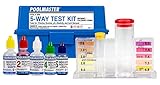
UV helps supplemental sanitation, but chlorine, pH, and alkalinity still need testing.
View on AmazonFAQ
Should my UV pool sanitizer be on a GFCI outlet?
Follow the manual for your exact model and local electrical code. Many pool UV systems require GFCI protection, and the Pentair BioShield manual specifically calls for a properly grounded GFCI. If you are not sure how your unit is protected, ask a qualified electrician or pool professional.
Is it safe to reset a tripped GFCI and keep swimming?
One reset after an obvious nuisance event is not the same as a recurring trip. If the GFCI trips again, if anything is wet or damaged, or if the UV controller behaves oddly, stop using that equipment and get qualified help before relying on it.
Can I use an extension cord for a UV pool controller?
Do not improvise. Use the power connection allowed by the manufacturer and local code. Outdoor extension cords around a pool equipment pad can create serious shock and trip hazards, especially near water, irrigation, and moving equipment.
Does a powered UV controller mean the pool is safe?
No. Power only tells you one part of the system may be working. You still need correct flow through the chamber, a working lamp, clean water balance, proper sanitizer residual, filtration, and routine testing.